





自動化 AI 本地化
本地化自動化改變了您翻譯應用程式的方式。ai-l10n npm 封裝將 AI 翻譯直接引入您的開發工作流程,並透過智慧自動化功能支援本地化檔案。
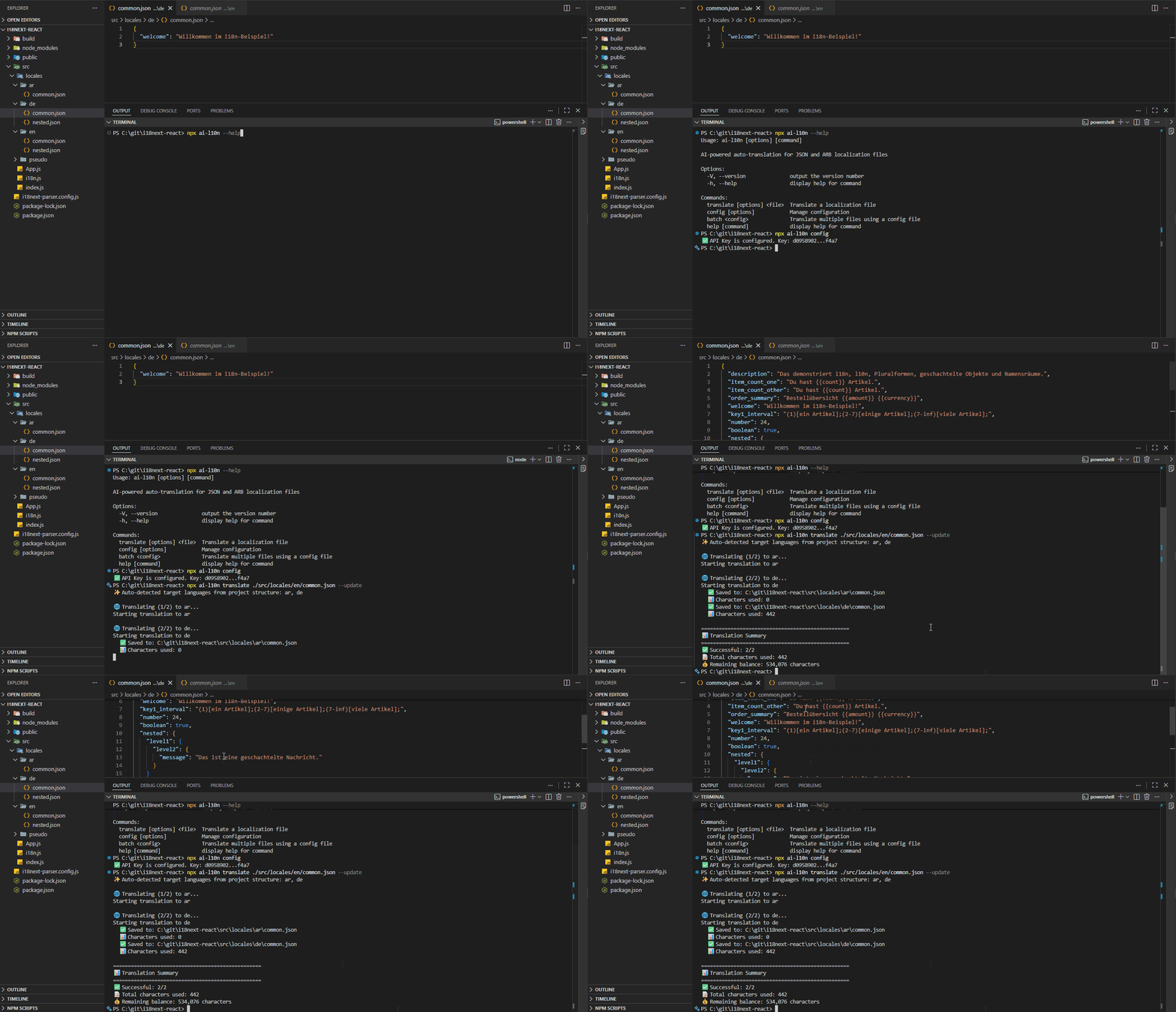
AI 驅動的本地化自動化實作
為何要自動化本地化?
手動管理翻譯既耗時又容易出錯。自動化提供:
- 透過 AI 驅動的自動化,節省數小時的手動翻譯工作。
- 透過語境感知的 AI 確保所有翻譯的一致性。
- 將翻譯直接整合到您的 CI/CD 流水線中。
- 自動偵測並翻譯新字串,同時保留現有的翻譯。
- 支援 165 種以上語言,並具備語境感知的翻譯品質。
AI 驅動的功能
ai-l10n 封裝使用先進的 AI 來提供生產品質的翻譯:
AI 能理解字串的語境,在保留佔位符、HTML 標籤和格式的同時,將日期和數字調整為目標語系。它能智慧地避免翻譯品牌名稱、URL 和技術術語。
從您的專案結構(基於資料夾或檔案)自動偵測目標語言。如果語言已存在於您的專案中,則無需手動指定。
保留 JSON 資料型別—數字保持為數字,布林值保持為布林值,null 值亦會保留。支援 i18next 複數形式,並為複雜的複數規則自動產生後綴。
若佔位符或格式遺失,會自動偵測並重試。對於大型檔案,會在維持語境的同時將內容拆分為可管理的區塊。防止直接上傳 AI 時因超過約 16,000 個字元而導致內容遺失的常見問題。
快速入門
使用 npm、yarn 或 pnpm 安裝 ai-l10n 封裝:
npm install ai-l10n
取得您的免費 API 金鑰 並進行設定:
npx ai-l10n config --api-key YOUR_API_KEY
使用簡單的指令翻譯您的本地化檔案:
# Auto-detect target languages from project structure
npx ai-l10n translate path/to/en.json

# Specify target languages
npx ai-l10n translate path/to/en.json --languages es,fr,de
使用情境
使用 CLI 進行快速翻譯,並完全控制選項:
npx ai-l10n translate ./locales/en.json \
  --languages es,fr,de,ja,zh-CN \
  --plural \
  --verbose
將翻譯直接整合到您的 Node.js 應用程式中:
import { AiTranslator } from 'ai-l10n';

const translator = new AiTranslator();

// Basic translation
const result = await translator.translate({
  sourceFile: './locales/en.json',
  targetLanguages: ['es', 'fr', 'de'],
});

console.log(`Translated to ${result.results.length} languages`);
console.log(`Used ${result.totalCharsUsed} characters`);
透過我們的 ai-l10n GitHub Action,將 AI 翻譯無縫整合到您的 CI/CD 流水線中:
建立一個設定檔:
// example ai-l10n.config.json
[
  {
    "sourceFile": "./locales/en/common.json",
    "targetLanguages": ["es", "fr", "de"],
    "translateOnlyNewStrings": true
  },
  {
    "sourceFile": "./locales/en/common.json",
    "targetLanguages": ["pl", "ar"],
    "generatePluralForms": true,
    "translateOnlyNewStrings": true
  }
]
新增至您的 GitHub Actions 工作流程:
name: Auto-translate i18n files

on:
  push:
    branches:
      - main
    paths:
      - 'locales/en/**'
      - 'ai-l10n.config.json'

permissions:
  contents: write

jobs:
  translate:
    runs-on: ubuntu-latest
    steps:
      - uses: actions/checkout@v4

      - uses: l10n-dev/ai-l10n@v1
        with:
          api-key: ${{ secrets.L10N_API_KEY }}
          config-file: 'ai-l10n.config.json'
          pull-request: false
使用 ai-l10n 批次指令的 GitLab CI 設定:
# .gitlab-ci.yml
translate:
  stage: deploy
  image: node:20-alpine
  only:
    - main
  changes:
    - locales/en/**/*
    - ai-l10n.config.json
  script:
    - npm install -g ai-l10n
    - npx ai-l10n batch ai-l10n.config.json
  variables:
    L10N_API_KEY: $L10N_API_KEY
使用 ai-l10n 批次指令的 Jenkins 流水線設定:
// Jenkinsfile
pipeline {
  agent any

  stages {
    stage('Translate') {
      when {
        changeset "locales/en/**"
      }
      steps {
        script {
          sh 'npm install -g ai-l10n'
          withCredentials([string(
            credentialsId: 'l10n-api-key',
            variable: 'L10N_API_KEY'
          )]) {
            sh 'npx ai-l10n batch ai-l10n.config.json'
          }
        }
      }
    }
  }
}
進階功能
僅翻譯新鍵,同時保留現有翻譯:
# Only translate new keys, preserve existing translations
npx ai-l10n translate path/to/en.json --update
使用設定檔一次翻譯多個檔案:
// example translate-config.json
[
  {
    "sourceFile": "./locales/en/common.json",
    "targetLanguages": ["pl", "ru", "ar"],
    "generatePluralForms": true,
    "translateOnlyNewStrings": true
  },
  {
    "sourceFile": "./locales/en/admin.json",
    "targetLanguages": ["pl", "ru", "ar", "de"]
  }
]
npx ai-l10n batch translate-config.json
針對具有複雜複數規則的語言(如俄語、阿拉伯語或波蘭語),自動產生所有必要的複數形式字串及正確後綴:
npx ai-l10n translate ./locales/en.json \
  --languages ru,ar,pl \
  --plural
全面支援 Flutter Application Resource Bundle 檔案,並自動更新中繼資料:
npx ai-l10n translate ./lib/l10n/app_en_US.arb \
  --languages es_ES,fr_FR,de
語言支援
l10n.dev 支援 165 種以上語言,並具有不同的熟練程度:
- 強 (12 種語言): 英語、西班牙語、法語、德語、中文、俄語、葡萄牙語、義大利語、日語、韓語、阿拉伯語、印地語
- 高 (53 種語言): 大多數歐洲和亞洲語言,包括荷蘭語、瑞典語、波蘭語、土耳其語、越南語、泰語等
- 中 (100 種以上語言): 廣泛的世界語言
專案結構偵測
ai-l10n 會自動偵測您的專案結構並據此產生翻譯:
按語言資料夾組織翻譯:
locales/
  en/
    common.json
    errors.json
  es/              # Auto-detected
    common.json
    errors.json
  fr-FR/           # Auto-detected
    common.json
為每種語言使用單獨的檔案:
locales/
  en.json          # Source
  es.json          # Auto-detected
  fr-FR.json       # Auto-detected
  zh-Hans-CN.json  # Auto-detected
最佳實踐
- 使用增量更新: 使用 --update 旗標僅翻譯新字串,保留現有翻譯並節省字元額度。
- 整合 CI/CD: 在每次提交原文語言檔案時自動化翻譯,以確保翻譯始終保持最新。
- 安全儲存 API 金鑰: 在 CI/CD 環境中使用環境變數或秘密管理來儲存 API 金鑰。
- 審核過濾後的內容: 檢查 .filtered 檔案中因違反內容政策而被排除的字串。
- 使用批次設定: 對於多個檔案,使用批次翻譯設定來從單一指令管理所有翻譯。
準備好用 AI 簡化您的本地化工作流程了嗎?
ai-l10n npm 封裝將專業的 AI 翻譯自動化直接引入您的開發工作流程。透過支援 JSON 和 Flutter ARB 檔案、智慧專案偵測以及無縫的 CI/CD 整合,您可以專注於建構功能,而翻譯則會自動完成。
立即開始自動化您的本地化,並加入數千名信任 l10n.dev 翻譯需求的開發者行列。